Curve objects are used to describe a functional relationship between two quantities. The following types of curves are used in SWMM:
- Storage - describes how the surface area of a Storage Unit node varies with water depth.
- Shape - describes how the width of a customized cross-sectional shape varies with height for a Conduit link.
- Diversion - relates diverted outflow to total inflow for a Flow Divider node.
- Tidal - describes how the stage at an Outfall node changes by hour of the day.
- Pump - relates flow through a Pump link to the depth or volume at the upstream node or to the head delivered by the pump.
- Rating - relates flow through an Outlet link to the freeboard depth or head difference across the outlet.
- Control - determines how the control setting of a pump or flow regulator varies as a function of some control variable (such as water level at a particular node) as specified in a Modulated Control rule. Is also used to adjust the flow from an LID unit's underdrain based on head.
- Weir - allows the discharge coefficient for a weir to vary with head.
Each curve must be given a unique name and can be assigned any number of data points.
The Curve Editor is used whenever a new Curve object is created or an existing Curve object is selected for editing. The Editor adapts itself to the category of curve being edited (Storage, Shape, Tidal, Diversion, Pump, Rating, Control or Weir).
Follow steps below to Add or Edit a curve using Curve Editor:
- To add a new curve, select 'Add New' from the Edit Mode dropdown box, to edit an existing curve, select the 'Edit' option
- Select the Curve Type
- Enter or select a name for the curve
- Enter curve's X and Y data value in the data grid, click 'Add New Row' button to add rows as needed. As data being entered, the graph is generated to the right side of the data grid.
- After all the data are entered, click the 'Save Data' button
| Field | Description |
| Name | Enter the name of the curve |
| Type | (Pump Curves Only) Choice of pump curve type (see Pumps below for a description of each curve type). |
| Data Grid | The curve's X,Y data. |
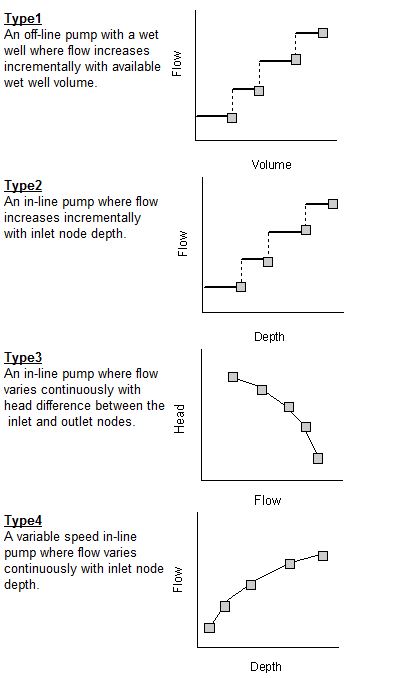
Pumps are links used to lift water to higher elevations. A pump curve describes the relation between a pump's flow rate and conditions at its inlet and outlet nodes. Four different types of pumps are supported: