Time Series objects are used to describe how certain object properties vary with time. Time series can be used to describe:
- temperature data
- evaporation data
- rainfall data
- water stage at outfall nodes
- external inflow hydrographs at drainage system nodes
- external inflow pollutographs at drainage system nodes
- control settings for pumps and flow regulators.
Each time series must be given a unique name and can be assigned any number of time-value data pairs. Time can be specified either as hours from the start of a simulation or as an absolute date and time-of-day. Time series data can either be entered directly into the program or be accessed from a user-supplied Time Series file.
The Time Series Editor is invoked whenever a new Time Series object is created or an existing time series is selected for editing. To use the Time Series Editor:
| Field | Description |
| Name | Name of the time series. |
| Enter data or upload file? |
Select a radio button whether to enter the data directly into the form's data entry grid or to
use an external file as the source of the data
If the external file option is selected, click the Upload button to
locate the file. The file's contents must be formatted in the same
manner as the direct data entry option discussed below and must be a csv file.
Click
here |
|
For direct data entry, enter values in the data entry grid as follows:
|
|
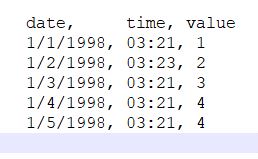
Note that there are two methods for describing the occurrence time of time series data
- as calendar date/time of day (which requires that at least one date, at the start of the series, be entered in the Date column)
- as elapsed hours since the start of the simulation (where the Date column remains empty).
For rainfall time series, it is only necessary to enter periods with non-zero rainfall amounts. SWMM interprets the rainfall value as a constant value lasting over the recording interval specified for the rain gage which utilizes the time series. For all other types of time series, SWMM uses interpolation to estimate values at times that fall in between the recorded values.