Manage Maps
What is it?
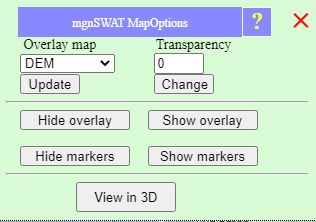
Manage map options allow users to show/hide maps, change opacity, show/hide markers, and view in 3D.How to use it:
Change overlay map
To change overlay map, select a map from the drop-down list under 'Overlay map' and click update. The list contains all the available 2D maps.Change map opacity
To change opacity of the overlay map, enter a new opacity value (0-1) in the text box under 'Transparency' and click 'Change'.Show/hide overlay maps
To hide overlay map, click 'Hide overlay'.To show overlay map, click 'Show overlay'.
Show/hide markers
To hide markers, click 'Hide markers' .To show markers, click 'Show markers'.