It may be helpful at this point to explain how one changes the number of nodes in a model. Given the model area is fixed (so far it has been a rectangle) the size of the rectangles used to represent the discretized aquifer is dependent entirely on the number of nodes (rectangles) used. The more nodes, the better the solution and the more computational work required to obtain a solution (since there is one equation per node). So, a key question is: how do you change the number of nodes or rectangles? The secret lies in the following figure which is obtained by clicking on Conceptual Model and then Domain Attr. The resulting figure (Figure 28) has a tab at the top called Simulation Settings. At the top left of the Simulation Settings menu is shown the number of nodes in the x- (west-east) direction, namely Grid NX. Here you can change the number from 40 to one that you prefer. The number of grid cells in the y- (north-south) direction is automatically calculated from NX and the shape of the model domain (e.g., if the model domain is longer in the y-direction than the x-direction, NY > NX).
Achieving more accuracy, or resolving some groundwater system dynamics – for example, the quick changes in hydraulic head in the vicinity of a pumping well – require more model resolution (more nodes), so you will want to increase NX to, say, 80 or 100. (The maximum number of grid cells in X direction for the student version of MAGNWT is NX_max = 150. The total number of grid cells in both the X and Y directions for the student version of MAGNET is NYNY_max = 100 * 100 = 10000.) However, it is good practice to use the default number of grid cells (NX=40) to understand the big picture and experiment with different aquifer representations before increasing the number of grid cells. You can always increase the number of nodes later when you are doing `production’ runs of the model.
An alternative to increasing the number of cells in the model is to make use of nested submodel, which can be interactively added and simulated in different, smaller areas of interest. This useful approach is discussed in the next subsection.
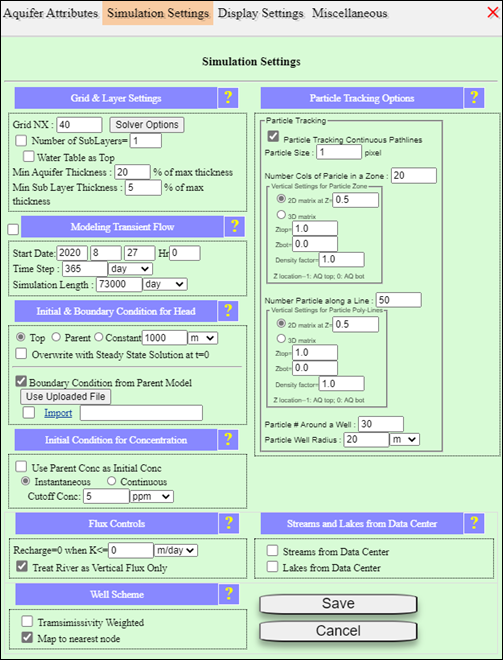
Figure 28: Simulation settings tab of Domain Attributes menu, where the number of grid cells in the x-direction can be assigned (default: NX=40).