To this point we have assumed that our flow model is time-independent. (NOTE: while we have modeled the time evolution of particle paths or dissolved species distributions, the flow field was steady, i.e., not changing with time.)
In this Section we introduce the concept of transient groundwater flow behavior. In other words, we will not assume the system is at steady state, but rather allow it to evolve through time from one state to another. To do this requires we define a new physical parameter that accommodates the elasticity of the aquifer (see Section 3.2).
To indicate that we are performing a transient analysis we open the Default Parameters and Options menu. To get there you click Conceptual Model Tools, then DomainAttr. Note that in the bar at the top of this window there is a Simulations Settings option that you must activate by clicking it. This action will yield the window shown in Figure 80. In the middle column, about half-way down the page, there is a Modeling Transient Flow option and to the left of this heading there is a small box that needs to be checked for transient flow to occur.
Note that you should NOT enable this feature when performing particle tracking or contaminant transport on a steady flow field. You may still adjust the time-step for particle tracking / transport if the "box" next to Modeling Transient Flow is unchecked.
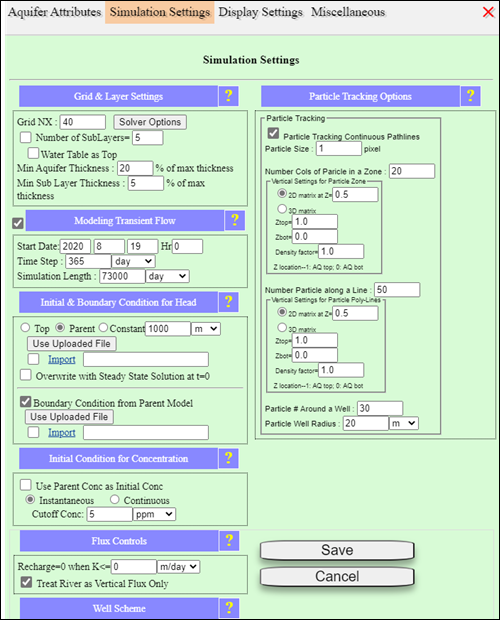
Figure 80: Window for enabling unsteady flow modeling, and using the previous (parent) steady model simulation results as the initial condition.